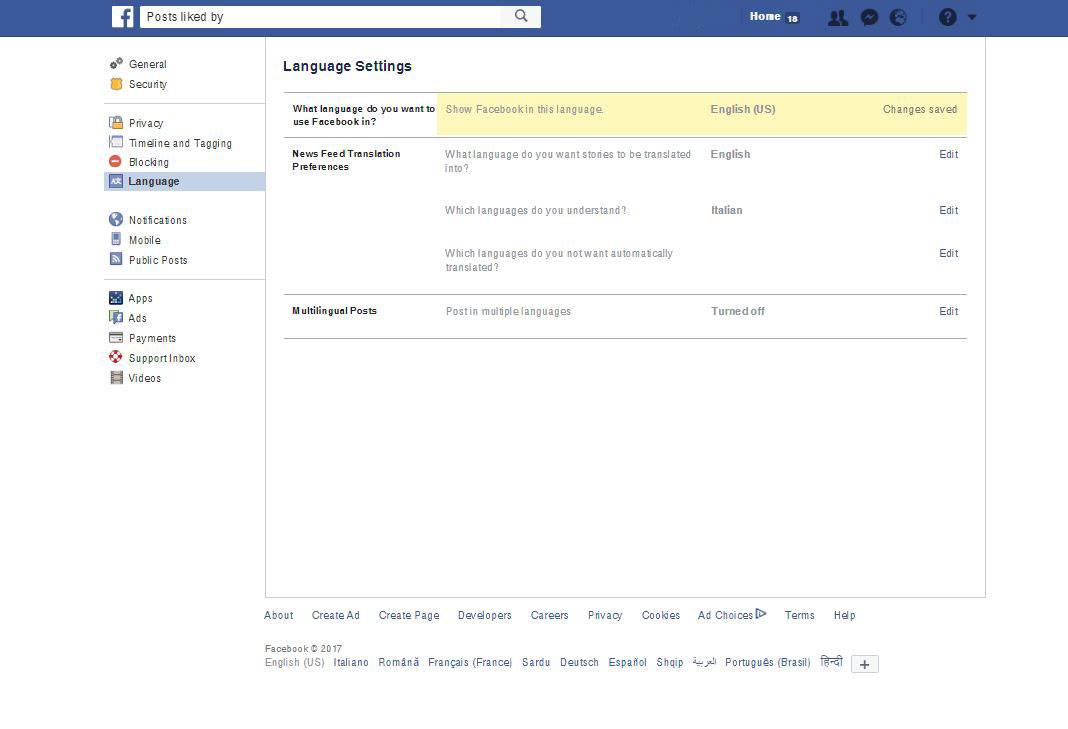
Discover your friends' list of likes on Facebook
It happens to everyone: arguing with a partner or friends over the likes left on posts and photos on Facebook.
Driven by jealousy or simple curiosity, we might want to look up how others behave on the most famous social network.
Thanks to a few small steps, still unknown to most people, it is now possible to see our friends' likes.
The procedure is simple, but unfortunately not yet available in Italian.
The first thing to do is go to your own profile, open the settings and change the language, switching from “Italiano” to “English” (UK or US makes no difference).
Once this is done, all you need to do is type this small string into the Facebook search bar: “Posts liked by [profile name]”, replacing the words profile name with the exact name of the person to “spy” on.
After pressing the Search button, all the posts and photos this person has liked will appear in chronological order, and can be filtered using the side options Posted by, Tagged location and Date posted.
The search results, however, may not actually include all the posts or photos this person has liked: they are visible according to the privacy settings each friend has configured.
In addition, posts to which a reaction other than a simple like has been added, such as a heart for the Love reaction, are not shown.
Even though it is not yet completely full of information, this method is a very convenient, easy and quick solution for anyone who wants to check the behaviour of friends and partners.